A real-world, fast solution for Exhibit 107

There’s a simpler, faster way to prepare exhibit 107 in inline XBRL, and it’s backed by GoFiler’s powerful import tools and our unparalleled customer service.
Request a demo Download a fact sheet


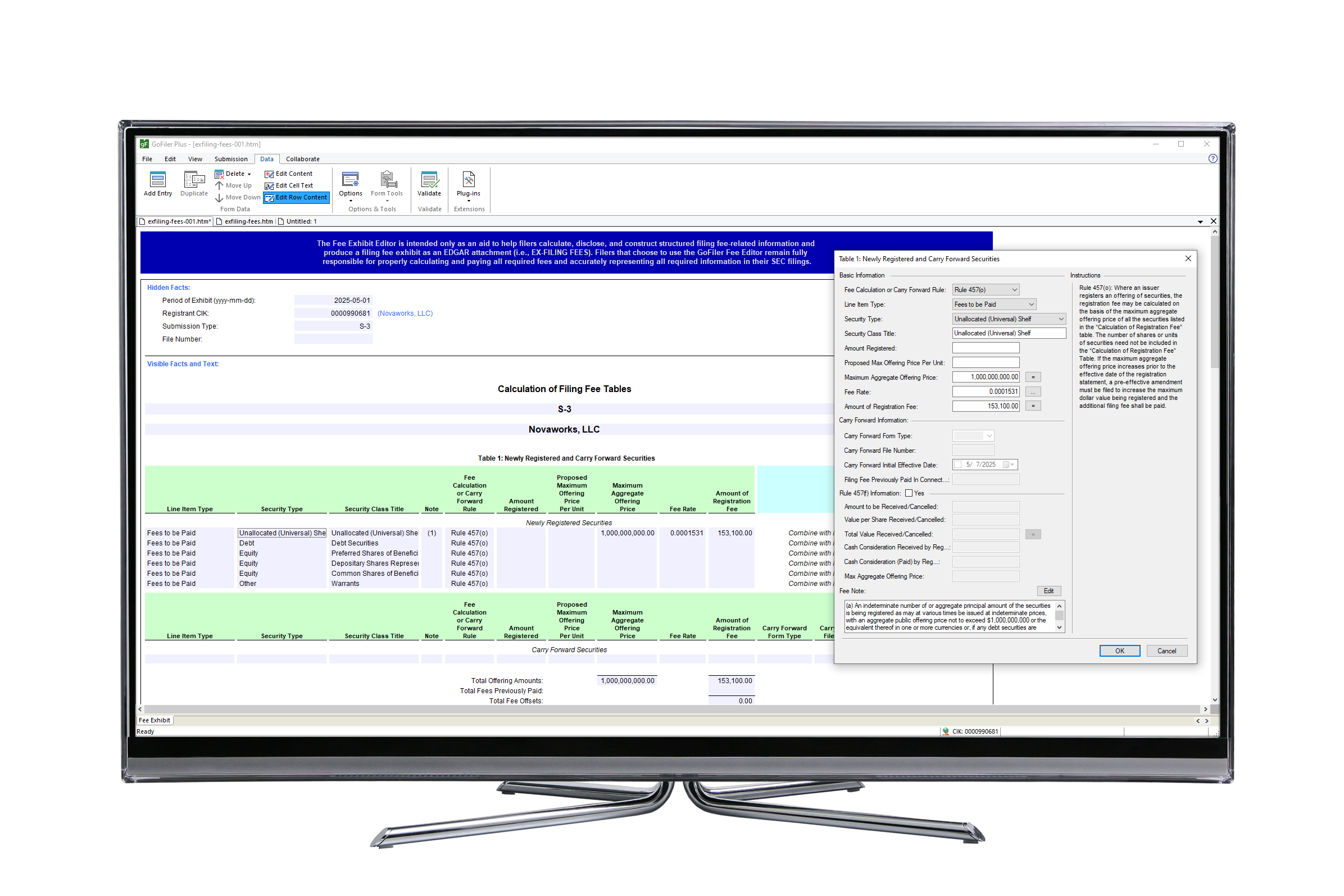
A computer monitor displaying FEE View in GoFiler

The Fee Exhibit Editor is just one of dozens of modules available in GoFiler. Start building your custom compliance software today!
13F 144 17-H 24F-2
ABS Exhibit Editor ATS-N C D
Data View EDGAR Standard Forms Fee Exhibit Editor MA
N-CEN N-CR N-MFP N-PORT
N-PX PDF View Regulation A SBS Entity Forms
SCHEDULE 13D/G SDR Section 16 Ownership Forms TA
X-17A XBRL GRIP Reporting XBRL SEC Reporting
Step One: Choose your base software.

GoFiler has two options to start building your custom software. The formats you need to file will determine which option to choose. GoFiler+ contains support for HTML editing as well as collaboration tools.

  GoFiler GoFiler+
Text View

Open and edit documents in plain text.

  • AutoFormat tools
  • Import functions to automatically convert to EDGAR ASCII
  • Reflow and alignment functions
  • Advanced text table editing
Code View

Open and edit the base code for HTML or XML documents.

Page View

Edit HTML as rendered documents with tools to view the file as it would appear in a browser as well as view the underlying HTML code.

  • Import functions to automatically convert to EDGAR HTML and xHTML
  • Advanced table editing, including tools to polish tables to add gutter columns, striping, and other formatting
  • Tools to insert page breaks and other document control fields, including functions to include the contents of another file
  • Validation to check your HTML code against EDGAR rules
Image View

Create or edit images and save them to EDGAR acceptable formats.

  • Paste images from other sources directly into GoFiler
  • Adjust image sizes and crop items as needed
  • Adjust colors, brightness, and contrast
  • Use drawing and text tools to adjust image content
Collaboration

Set up collaboration tools to have keep your team on track.

  • Lock access to functions and features based on passwords or the Windows Active Directory
  • Set tasks and reminders
Step Two: Select your modules.

Each module for EDGAR filing contains the tools necessary to create, import data into, edit, validate, review, and file the specified submission types. Other modules contain the tools for creating and editing documents within the specified formats. The following modules may be purchased to build your custom compliance software package. Modules can be added to your subscription at any time.

EDGAR Submission Modules
13F 144 17-H 24F-2
ATS-N C D EDGAR Standard Forms
MA N-CEN N-CR N-MFP
N-PORT N-PX Regulation A SBS Entity Forms
SCHEDULE 13D/13G SDR Section 16 Ownership Forms TA
X-17A
EDGAR Exhibit Modules
ABS Exhibit Editor Fee Exhibit Editor
XBRL Reporting Modules*
XBRL SEC Reporting XBRL GRIP Reporting
Document Editing Modules
Data View PDF View

* XBRL Reporting Modules require GoFiler+ as the base software.

Frequently Asked Questions

GoFiler supports the creation of exhibit files for all filing fee rules. To begin, users can choose the corresponding EDGAR submission type for the EX-FILING FEES exhibit file. Once the correct exhibit has been started, the next step is to add the data to the template. It is during this process that you can choose the desired rule.

No. GoFiler does all of the “tagging” automatically. When you work in GoFiler, you can edit your exhibit as a simple form. GoFiler handles the inline XBRL format for you, so you can work with your data. All of the element selection, inline XBRL encoding, and HTML formatting is performed behind the scenes so you simply add your data, perform the fee calculations, and save your exhibit.

Users are alerted to fee rate changes through a news feed directly in the software. Once a new fee rate is effective, you can instruct the software to download the latest fee rate table directly from the SEC. Tools to check that the fee rate table is up to date are included on most fee calculation dialogs.

The FEE module for GoFiler does not include EDGAR form submission. Fee exhibit files that are created in GoFiler can be saved and attached to an EDGAR submission in other filing software or uploaded and attached to a submission created in EDGARLink Online. You can also purchase the EDGAR Standard Forms Module as an add-on to your GoFiler software, which includes support for EDGAR form creation and submission.

Yes. GoFiler offers numerous templates that adjust the formatting and styling of the exhibit files. We include default templates to match the style of the documents created by the SEC’s Fee Exhibit Preparation Tool (FEPT) as well a simpler look. Our support team can help you transition to GoFiler and create a template that matches the style and branding of your organization.

Only certain functions in the software, such as the tool to download the SEC fee rate table, require a connection to the internet. With GoFiler, you can work offline at any time and connect only when necessary.


Our website uses cookies to give you the best user experience on our website and to help us deliver our services. By using our services, you agree to our use of cookies. Click here for more information.
OK