Tuesday, March 17. 2026
Section 16 Filing Hot Fix Now Available
1. Make sure all the new address fields are blank. The background lookup for reporting owners will fill these fields out. This means that they may need to be cleared several times.
2. Add the following lines to %AppData%\Novaworks\GoFiler Complete.ini. If you are using GoFiler Basic, GoFiler Plus, or any other version of GoFiler, change the name of the ini to match the product. For example, GoFiler Basic users should use GoFiler Basic.ini:
[Section 16 Beta]
Use New Address Format=0
3. Use the installer to go back a version.
- Right click on the installer in Windows Explorer
- Select "Copy as Path"
- Hit Windows Key + R (or press the start button, and type Run and select the Run command)
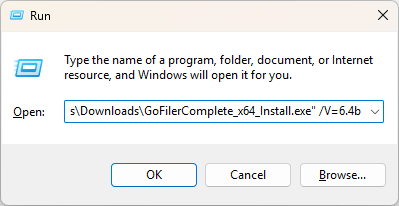
- Paste the path into the run box, then add " /V=6.4b". The resulting command should look like this:
You only need to choose one of these options in order to file. On March 18th, users that choose the first option may continue working normally. Users that choose the second option may delete those lines out of the ini file to continue using the new format. Users that choose the third option must run the updater to go back to the newest version.
Should you need further assistance, please feel free to contact technical support at: support@novaworkssoftware.com.
Quicksearch
Categories
Calendar


Feeds